Showing posts with label Papua New Guinea. Show all posts

Saturday, 13 March 2021

Indoor Plants and an Update About My Life

Darkness is the absent of light. While it’s a pretty straightforward understanding that our primary need for light is to see things around us, there is a much higher purpose for its existence and one could simply think of it as the existential ingredient for which lives on Earth could thrive.


But in a room that does not receive an ample serving of sunlight, how does one’s plant be able to appear green and stay that way? 

Fluorescent lights, and a few led lights. Just a couple of it actually.


After six months in the cold and dark corner of my room, one of my orchid plants had shown resilience against the gloomy odds and it bloomed with quite a handful of purple flowers. 

Quite a spectacular sight to see.


The secret to making the plants grow and bear flowers without the real sunlight is for them to get artificial lights that have at least two of the colors from the spectrum of light. To stimulate growth, it needs to have a cool white light and a red light to encourage flowering.


It’s like decades ago since I last made my school projects. But a couple of while ago, my boss had asked me to make the covers for these two Minecraft costumes. I’m not particularly a fan of Minecraft and have never played it on PC. 

I hope the kids who would wear these costumes could forgive me if I didn’t get it right.


Here’s John, our newest IT staff. He was an OJT when I took this photo. Here, he was tasked to put a plastic sheet on the cameras because the contractors were painting the metal ducting to which the camera was attached. 


The person on the left is Dickson, another one of our IT Staffs and John is the one seated. Here they are preparing the cameras for one of our clients. If you ever come and work in the IT Department at our company, you’d be learning nice things and installing CCTV’s is one of them.


John graduated with an IT course and Dickson didn’t. But this is a good example of why experience is sometimes better than having a degree. In this case, it was Dickson who was explaining to John a few technicalities in network cabling. If you ever wonder how Dickson has gotten so good with IT stuffs, I guess he has a good teacher.


Well, who could that teacher be? Ahem. 


So, in the eyes of their humble teacher, they are now worthy of being called the masters of CCTV installations. 

Hey wait a minute! Why is John smiling broadly in almost all of the pictures? 


This printer was sent to us from one of our departments for repair. They say that it’s ON but it refuses to obey what they ask it to do.  

Now what were they asking it to do?


Anyway, I suspect that a mitigating factor is a faulty board. In this photo, I’m showing Dickson how to use a desoldering pump to remove the power module from the faulty board. Later that afternoon, we replaced the board with a reliable one from another faulty printer of the same model and reattached the power module.

It worked like a charm.


Here are some of the corrugated hoses that I would always buy from Leon Hardware. If you ever wonder what I use these for, I use it for protecting cables and speaker wires. As generally presented idea with evidence, rats will have a hard time chewing on them. 

And the insurance company will be more than happy to see us using these.


Here’s Ivan, my nephew. He just recently joined our company as the IT replacement for Raffy who resigned last year. In this photo, we are at a client’s house doing inspection in preparation for CCTV installation.


Ivan is tall person, and is visibly taller than me. I’ve seen him grow from being a small toddler up to that size. I think that if the new generations continue to outgrow the former ones in terms of height, the Earth will be repopulated once again by giants. 

Until next time. Happy weekend everyone!


Monday, 14 September 2020

Celebrating 45th Year of Independence In Papua New Guinea

Looking back at my first entry for this blog, it feels like I'm getting old already. It's been 6 years since I wrote my first post "My Humble Beginning in PNG" and I must admit that I barely noticed how fast the years had gone by. I came here in 2008, went back home after a few months and came back again in 2011. And today, is my 9th year in this country that I consider my second home. 

I only started blogging about Papua New Guinea in 2014, and I wish I could have done earlier. But I have no regrets anyway. I think I've given my fair share of contributions to the blogosphere. Also, I'm under the notion that blogs are increasingly getting less popular than vlogs nowadays. And judging from the number of hits that this humble blog gets every now and then, I suppose that blogging, particularly my blogging, has seen its golden days. 

But I'm also a firm believer of this one verse in the Bible that says "That which is, already has been; that which is to be, already has been; and God seeks what has been driven away."  It basically implies that some things which have seen glories in the past might find their seats again in the arena of the future, especially, if those "things" had been of something great in the past. 

I guess if I were to predict which of the things from the past could make a comeback, I would say it was Blogging.

By the way, two days from now, the People of Papua New Guinea will be celebrating their motherland's 45th year of independence. I hope that we, despite the hardship and the current marginal lifestyle with which all of us are going through right now due to the COVID-19 pandemic, can still find a way to smile and celebrate this once-in-a-year chance to cherish the birth of this nation in our own style. 


Keep safe everyone. Until next post!


Tuesday, 24 December 2019

Merry Christmas

The year 2019 has brought us a concoction fun, hard work and mind-crushing challenges, but it also came with a couple of good rewards which I should talk about later in the upcoming posts.

They say that if a dragon or a "lion dance" has come to pass by and dances nearby, and someone happens to be present at its path, well not necessarily directly on its path, but somewhat closer to where it's at, then luck will come to that person.

I'm not sure if touching the lion costume will double that "luck" but it doesn't hurt to try.

Anyway, I just want to greet everyone a Merry Christmas and I wish you all good luck in 2020. Cheers!

Thursday, 4 July 2019

A Busy Life and A Little Experiment

A golden rule that I've come to learn over the course of my life is that there is no harm in trying. Thus, I and my IT staffs have gone to extra lengths just to try and test for a very common information that a Hikvision IP Camera will not run by a UTP cable of more than 50 meters away on a POE supply. While some people with glimmering technical background in this field will probably agree with it, I am not ready to jump on the bandwagon just yet without putting up a little pillow fight and proving how correct that information is.

So it has come to pass that I have asked my two staffs to cut an approximately 100 meter of CAT6 pure copper cable and to help me run a test of our own. Oh by the way, the person on the left side whose two hands are gripping a roll of orange cable is Sylvester and and that's his cousin Dickson on the right.

If Discovery Channel has Adam and Jamie for MythBusters, I have the back of  these two guys here to help me perpetuate an unscrupulous plan of busting some myths for fun; and to whom I had promised a bottle of cold Coke should we emerge victorious in the end.


The camera location is perhaps around 30 meters close to where we have set up our NVR (Network Video Recorder) so we still have the remaining 70 meters of CAT6 coiled under the table.


And look at that, it works! While it is not in my best intention to prove other people wrong, I do acknowledge that I wanted to prove something to myself. Things could be better understood if one chose to tackle the subject in an engaging manner.

Here's the detailed summary of our mini-experiment:
Success rate                             :  100%
Hostilities met along the way   :  0%
Casualties                                 :  0%
Minor Injuries Sustained          :  0%
Satisfied people                        : 3
 Oh we did go and drank some cold Coke afterwards. Happy weekend everyone!


Monday, 14 January 2019

Confidence in the Workplace


Having a job and doing the actual work is like being in a beach, trying to walk our way past against a series of waves. The water is your work environment and the waves are the problems you encounter each time.

Life in the workplace isn’t smooth, and you need to face the proverbial waves. No matter how small or big the waves are, you still take the courage to face them head on, even if they swat you like a bulldozer. But like the waves, those problems will come to pass, whether you’ve solved them or not. Like the waves, if you’re not able to stop it, something else will (thanks to the big rocks on the shore).

Or somebody else will.

The good thing however, is that each time you have courageously stood against the incoming waves, you gain experience. You build character. And those characters become you. You can even say, “Hey look, I’m The Hulk!” But I’m just kidding. What I actually mean to say is that the more problems you overcome, the more confident you may become.

Confidence is actually about thinking and saying, “I’ve done this before, and I know I can do it again.” That is, if you’ve been through that situation before. But when you’re about to face something that you have previously never come across of, confidence becomes believing in yourself.

So confidence is really about knowing what you can do and believing in yourself that you can do more. Apply that sense in the workplace, you won’t become unstoppable, but you’ll become adequately and confidently capable.

If not, then at least you become a "Papable."

Monday, 25 June 2018

Some Programming Stuff

When time permits and I'm in one of my agreeable moods, I usually write a piece for my technical blog called Through The SQL. That blog is all about software programming and a few bits of troubleshooting stuff. Anyway, here's a post that I wrote for that blog sometime ago with its original content.
In Visual Foxpro 9 (VFP) and it’s lower versions, there exists a logical field with which a programmer can use to have some kind of a digital flip-type switch that we regularly use in queries or in a control, like a checkbox, for example. If one can imagine how a light switch works, the idea behind is the same with that of a logical field. The apparent difference emerging from the point being that is, the usual ON and OFF status that we regularly see on a common household light switch is omitted, the logical field in VFP uses a boolean value of either .T. or .F. instead, with “.T.” representing the value for TRUE and “.F.” for FALSE.

So it’s kind of like when your dad asks you if you have left the garage lights on overnight, you may probably hear, “Is it TRUE that you have left the lights on last night?”

Anyway, Creating a logical field in a VFP cursor is as simple as this.

Create Cursor curTest (field1 l)

Select curTest
MODIFY STRUCTURE


But in MS SQL Server, with versions like 2008 or 2012, there is no Boolean or Logical field type. This is probably the reason why I see many software developers turning their trust to characters and integer types just to work around this inadequacy. 

For instance, a programmer can use several of the INT (integers) type field just to represent a value of 0 or 1. Because 0 and 1 can both respectively represent the ON and OFF nature of a basic switch. The idea makes sense until you add another value, like “2” then it loses the foremost characteristic of being a “flip-type” switch. 

The Workarounds in SQL Server


I’ve seen programmers use the int type, which has a range of -2^31 (-2,147,483,648) to  2^31-1 (2,147,483,647) and can take up storage of 4 Bytes in the table. Others use the smallint type, of which range is shorter than the int type but takes up 2 Bytes of storage space. There is also the tinyint that has a range of only 0 to 255 and takes up one Byte of storage space.

One thing to consider when you are feeling a bit determined to use these INT types for a simple switch is that each column of int created in a table will take up the storage space that I mentioned above. For example, if you have two columns of a tinyint field, each column will respectively take up one Byte of storage in a table.

At the other end of the spectrum, there are also those who use a character field to represent a switch in a similar fashion. These programmers, like I do in the early stages of my programming career, have liked the idea of using CHAR(1) type field to mimic the purpose of a logical field. The reason being is that it’s a straightforward solution and it’s easy to read. All that one needs to do is update the char field with a string having a value of “T” or an “F” character. 

The downside of using a char(1) field, however, is that it can take up other characters as well like “A” for instance, aside from the “T” or “F” characters. Also, each char(1) type column’s value in a table will take up 1 Byte of storage. Therefore, if you have two of this column in your table, the values will take up 2 Bytes and so on.

What I Think Is the Right Way to Do It


The best thing to do, in my humble opinion, is to use a bit type field in MS SQL Server. This type accepts integer data type like a bit value of 1 or 0, and it can have a NULL value as well.  

In this example, I’ve created a temporary table with a bit type field. I then inserted a 1 value.

If (Select name from sys.tables where name like '%#testTable%') is not null
      Begin
            drop table #testTable;

            create table #testTable (field1 bit);
     
            insert into #testTable (field1) values (1);
           
            select field1 from #testTable;     
      End

The advantage of the bit type is that it can automatically convert the string values TRUE and FALSE to bit values.  The “TRUE” becomes 1 and “FALSE” becomes 0.

If (Select name from sys.tables where name like '%#testTable%') is not null
      Begin
            drop table #testTable;

            create table #testTable (field1 bit);
     
            insert into #testTable (field1) values ('TRUE');
           
            select field1 from #testTable;     
      End

Sending Updates from Visual Foxpro


Luckily, MS SQL Server will convert the boolean value sent from Visual Foxpro by way of SQL-Pass Through or (SPT) connection.  

For this example, I have a table that I use for keeping LEAVE PAYS. It has a bit type column named isLeapYear. Let’s see what’s in it.


Notice that all other values in the isLeapYear column has zero values except for what’s in the fourth row, which has a bit value of 1.

Now, let’s try and change that into 0 (zero) by sending an UPDATE from Visual Foxpro with this command.

=SQLExec(oHandle.nHandle,'Update MyDatabase.dbo.MyTAble Set isLeapYear = .F.')


Now, we can see that all of the values in the isLeapYear column became zeros. 

Showing the Results with a Checkbox Control in a Grid


Let’s change the value of the fifth column, in the first row to 1. Then we’ll pull the records from MS SQL Server to a Visual Foxpro Grid that has a checkbox column.

=SQLExec(oHandle.nHandle,'Update MyDatabase.dbo.MyTAble Set isLeapYear = .F. where lpID = 9')


 So, this is how it should look like now. 


After we pulled the records from SQL Server, this is what a grid with a checkbox control would look like. Notice that the checkbox is automatically ticked because the underlying value in that column is .T. while the rest have .F. values. I will discuss how I created this checkbox in a grid  on a new post once I get a free time again.

Final Thoughts


Visual Foxpro is somehow lucky to have found its Logical values automatically converted by MS SQL Server to bit values. 

But another point worth considering for using a bit type field is that the SQL Server Database Engine optimizes storage of bit columns.  For example, if a table has less than 8 bit columns, all of the columns are stored as 1 byte. Having more than 8 bit columns but less than 16 will be stored as 2 bytes and so on.

As opposed to using an int type that always stores 1 byte or more per column, this is a great way to conserve server storage space if one is too concern about data normalization and storage conservation. 

Have a nice day!

Wednesday, 9 May 2018

Attendance Program and CinchPro Payroll System

In 2013, the management in the company that I am working with bought a couple of attendance biometric machines from overseas. It didn't have an attendance software to go with it and it would be a waste if we couldn't use it.So what I did was that I asked the company to give me a whole fortnight (14 days) to program an attendance software that can automate our existing manual time sheet calculations.

This is the software that I came up with. It gets the data from what the biometric machine yields and could do rapid calculations of the total time incurred as well as figure out late penalties. The note on the leftmost side at the bottom says it's already in its 4th revision.Since 2013, the reason why it's very easy and fast to generate time sheet reports has largely been due to this. We didn't have to calculate time from the time cards manually.


This is just one of those biometric machines, and it remarkably held in time. For five years, the company that I'm working with is still using these machines together with the attendance software that I have created for them.


This is the Payroll System that I developed from scratch. In the early years leading up to its creation, I had an intermittent opportunity to help our accounting office with payroll works for quite some time. Those good times had helped me earned a considerable amount of knowledge in payroll stuffs, which then led me to the creation of this latest software, the CinchPro Payroll System in 2017.


The CinchPro Payroll System works in tandem with my Attendance Program. With so many things going on in the payroll, one could easily make a mistake if it's done in Excel. Also, the repetitive tasks can be tedious. By using CinchPro, one can easily generate reports on the ply.

The modules in the CinchPro Payroll Systems include:

  • Staff Recording
  • Unique Position Monitoring
  • Money Booking
  • Bread or Item Booking
  • Uniform Deductions
  • Loans
  • Other Deductions
  • NASFUND PNG
  • Taxes
  • Entitlements such as Leave Pay, Finished Pay and Long Service
  • Monitoring absences through Medical Certificates 
  • Generation of Pay Slips and other reports
  • Payroll for Factory workers that gets paid by pieces of work.
  • Generating Excel file counterparts for sending payroll to BSP or ANZ bank for processing.


Friday, 4 May 2018

A Short Work in Daru Island

Daru Island reminds me of the old Palayan City that I used to live when I was a very much younger version of me. From the familiar unpaved roads and to the homochromous vegetable stalls that lined up the sidewalk, the whole scenery is like a blue pill for the mind. One can think about ingesting that pill as a wonder drug that can instantly bring forth a recollection of experiences in the past, and the most apparent effect is a blissful feeling of having been transported back to the time when almost everyone else is living in simplicity.

Back when the word mobile phones do not exist in the dictionaries and tablets are just a remedy for an aching head.


But in Daru Island, the unpaved roads and small makeshift houses do not equate to being held back in time. While most people there don’t own a mobile phone, a number of residents and visitors from the mainland that come from all walks of life do carry a communicating device with them. 

While I’m happily expecting a kind of communicating device of local ingenuity, the advancement in technology in Daru is catching up to the latest trend. Gone is the era when empty tin cans hooked up to a short distance by a piece of string is used as a phone. The influx of overseas items there has brought people to get closer to using touchscreen phones or tablets.


This is the room that was assigned to me for the duration of my stay. It’s a bit spacious and has its own bath and toilet.  I have a window that is facing towards the beachfront. In the night, I always have enough time to admire the beauty of the seas, but during such time, everything outside is engulfed in total darkness.


Here’s the old shop that our company is replacing with a much bigger shop within the compound. At that time, it’s still operating.  Part of my job there is to install the network that new POS machines will use.


This is kuya Levi and he was showing me things around the old shop. One can buy almost anything from there.  At one point in time, I even saw one customer buying a set of wheel bearing from our shop. I didn’t know we’re selling bearings.

Now, that was nice. 


The cashiers in the old shop are all using cash registers to record sales. In the new building that we were setting up, all of these cash registers would be replaced by POS machines.


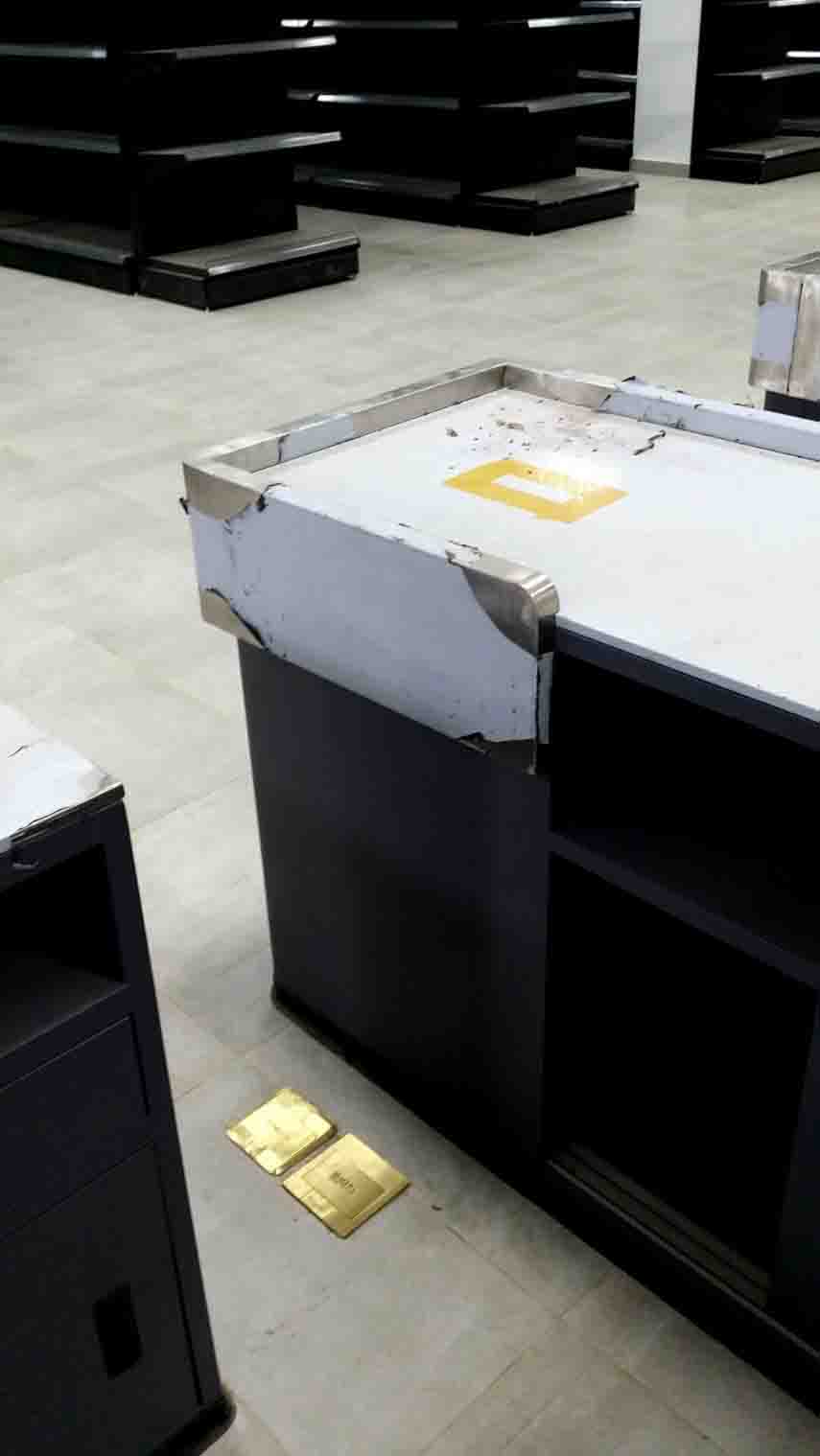
Here’s the new building for the new shop. The guy wearing a red hat is Sirigi and the guy in the black hat is Kelly, and what they were working on at the time was grinding holes underneath the POS counters to make way for the network and power cables. I took the measurements beforehand and drew some rectangle patterns at the bottom of the counters so Sirigi could easily cut them out.


Buried within the floors are networks of cables that go out to these golden ports.  Once the counters are placed over them, they will cover up these ports and it will defeat the whole purpose so my idea was to cut out holes at the bottom.


Cutting out a hole at the bottom wasn’t an easy task because the metal sheets are a hundred times thicker than an average paper. It required us to use a grinder and a pair of sturdy hands. In this case, Sirigi has that pair.


While Sirigi was doing all the relentless cutting, I assigned Kelly to help me with the installation of conduits on the walls through which external cables would go.  

Hey look! I think that was Levy trying to show Kelly where to drill the tucks into. 


The new shop features new type of shelves and has sufficient number of ceiling fans to cool the place down. I was also tasked of installing speakers and CCTV cameras on the ceiling.


My strategy at the time being was to work on what’s important the most. Our POS supplier, Harsya, had only 2 weeks to set his POS up. He’d be needing all the help that he could if he wanted his job done on time. We agreed about letting him work on his POS while I did the cabling. 


I’m a network enthusiast and even though I seldom do network cabling installations, I have network tools that I buy just so I can have one to use. For example, I have bought this LAN tester as a gift to myself when I had an extra money. This is a bit pricey compared to the other types because this model can also test for continuity in coaxial cables.


Kelly is the kind of person that you can depend on in the workplace. If you showed him once how things are done right, he’d catch up easily. 


Installing CCTV cameras in Daru is quite an enjoyable thing to do,  it doesn’t require much effort if you already know what you’re doing. Actually, I only remember drawing something like a floor plan on a piece of paper and using a little math for calculating the length of cables. 

Just kidding. Installing CCTV cameras require a certain degree of effort. First, you need to know what type of CCTV System suits the place well. Next is to estimate the amount of cables to use based on the camera locations if you prefer not to use a wireless system. Another thing to consider is how you’re going to power up the cameras. For Daru branch, I chose to use the 18-port 12-volt power box that could supply all 16 cameras at once. 


Here’s the power box that I’m discussing about. It’s straightforward and easy to install. Each port has female sockets to which there are two clips that the wires can be plugged into.

The only thing that you need to watch out for is the strictness in polarity.


I took care of soldering the BNC connectors to the cables. How do I know these things? In 2008, I took up short courses in practical electronics and automotive electronics at TESDA in the Philippines in two different occasions. 


Here’s what our cameras looked like after the installation. Pretty neat huh?


For outdoor cameras, we used pvc pipes and chemical pipes as conduits to hold our cables in place. 


The black box on the top left is a 24-channel public address system. I’m testing its sound quality with two speakers. For some reason, there are some people who prefer to place the speakers under a series connection. But I digress, because speakers are better off in parallel connection.


I showed Kelly how to affix the speakers to the ceilings and as expected, he picked up quickly. Back in the old days, we used to make perfect circles in elementary school using a cheap compass. It's pretty surprising that even after more than two decades, the way we make perfect circles didn't change that much.


My conclusion is that it is much easier and faster to install a public address sound system than the CCTV systems.


Here’s Alejandro, a Filipino manager in the shop, trying out the quality of the sound system after the installation. He seems happy enough after the initial testing.


And here’s Harysa (on the left) and Levi (on the right) giving thumbs up after the successful installation of Airpos POS machines on the counters. 

That’s all for this week. Until next time.


Related Posts Plugin for WordPress, Blogger...